On June 23, 2026, CISA published advisory ICSA-26-174-07 for the Hubbell Aclara Metrum Cellular Web Interface. The advisory describes missing authentication for critical functions, with potential impact on configuration and communications. For a maintenance team, the practical lesson reaches beyond one device name. Remote telemetry equipment can sit far from the control room, but it still affects operations, visibility, and outage recovery.
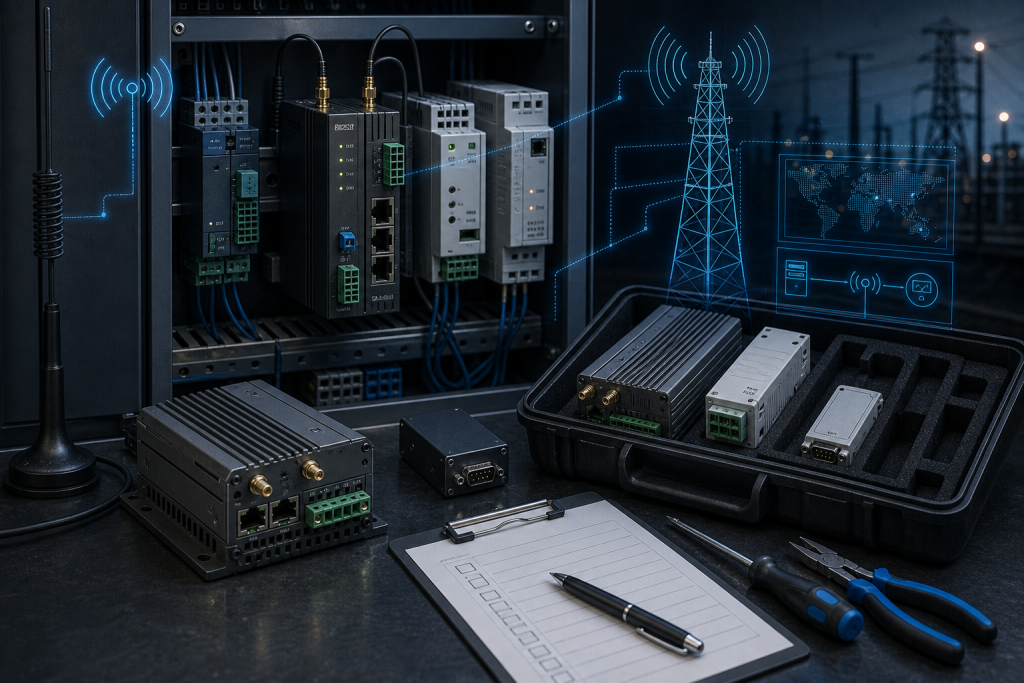
Many plants and utilities use cellular interfaces, meter gateways, remote terminal equipment, and small communication devices in substations, water sites, tank farms, pump stations, compressor yards, and remote metering cabinets. These assets often live between traditional OT and field communications. They may not appear in the PLC spare-parts register, yet losing one can blind a maintenance team to status, alarms, energy data, or remote diagnostics.
Why a communication advisory belongs in spare planning
A missing-authentication issue is normally discussed as cybersecurity exposure. That is correct, but it is not complete. If a remote interface must be replaced, isolated, reconfigured, or upgraded, the plant needs hardware evidence, configuration backup, antenna details, carrier information, power requirements, and a recovery owner. Without those details, a security response can become a field-service problem.
Remote telemetry spares are especially sensitive to small differences. A unit may look physically similar but use a different cellular region, connector arrangement, firmware, power input, mounting style, or configuration method. A replacement that works in one country or carrier environment may not work in another. The spare strategy should therefore treat the device, antenna, cables, SIM or carrier requirement, enclosure, and configuration file as one recovery set.
DriveKNMS has seen the same pattern in monitoring and control-room assets. A plant may document the main PLC rack carefully, while remote monitoring hardware is recorded only as “gateway” or “modem.” Our monitoring systems notes focus on closing that gap because visibility hardware can become production-critical during an incident.
What maintenance should inventory first
Start with the installed population. Record model, serial number, firmware if available, enclosure location, antenna type, power input, network role, connected meter or controller, and whether the device supports monitoring only or any operational control. If the device is in a remote site, include site access constraints and environmental condition. A spare for a cabinet on a clean plant floor is not the same as a spare for an outdoor station reached by a service truck.
Next, verify configuration backup. A spare cellular interface is only useful if the team can restore APN settings, IP addressing, firewall rules, certificates if used, user accounts, routing, protocol mapping, and any site-specific polling configuration. If the configuration has never been exported, schedule that work before the next maintenance window. Do not wait for the failed unit to become unreadable.
Finally, check the physical kit. Antennas, pigtails, terminal plugs, DIN rail clips, surge protection, ground wiring, cable glands, and power supplies may be required for a complete replacement. In remote telemetry work, a missing connector can create more downtime than the main device.
How procurement should frame the RFQ
A good RFQ for remote telemetry hardware should include photos of the device label, connector side, installed cabinet, antenna and cable arrangement, quantity, condition requirement, delivery site, and deadline. If the request is related to the Aclara advisory or a security mitigation window, say that without exposing credentials. This helps suppliers understand whether tested availability, exact match, or a broader recovery kit is required.
Condition language should be explicit. A tested used device may be acceptable for temporary restoration, while a long-term spare may require new surplus or a verified exact match. If substitutes can be reviewed, the plant should define which details cannot change: cellular bands, protocol, power input, enclosure fit, firmware range, or carrier approval.
Procurement should also coordinate with whoever owns remote access. Cellular replacements can require carrier work, SIM changes, firewall approvals, or cybersecurity review. A device that arrives quickly can still miss the maintenance window if these approvals start after delivery.
For urgent requests, DriveKNMS recommends using the request a quote workflow with photos and field notes attached. The goal is not to create paperwork; it is to prevent the wrong version of a remote interface from arriving at a site that has no easy second attempt.
It is also worth checking whether the remote device has become the only path for routine data. Some plants originally installed cellular telemetry for convenience, then gradually depended on it for production reporting, maintenance alerts, or energy balancing. If the device is now part of daily decision making, its spare priority should rise. The audit should capture who uses the data, how quickly they need it restored, and what manual workaround exists if the link is unavailable.
FAQ
Does the Aclara advisory mean every remote cellular interface must be replaced?
No. First confirm exposure, version, access controls, and vendor mitigation. Replacement matters when the device is unsupported, compromised, failed, or too risky to keep in service.
What should be included in a remote telemetry spare kit?
Include the device, antenna requirements, terminal plugs, power supply or wiring notes, mounting parts, configuration backup, and commissioning instructions.
Why do cellular bands and carrier details matter?
A physically similar device may not work on the installed network if region, bands, carrier approval, SIM format, or firmware differs.
What photos help the supplier quote faster?
Send the nameplate, connector side, front view, installed cabinet, antenna/cable arrangement, and any safe firmware or configuration screen.
If your team is reviewing remote telemetry exposure after the Aclara advisory, send DriveKNMS the device photos, site role, quantity, condition requirement, and deadline. We can help turn a field communication concern into a practical spare and recovery plan.
© 2026 DriveKNMS. All rights reserved. Official Website: https://driveknms.com Inquiry: sale@driveknms.com | WhatsApp/Tel: +86 18359293191