The latest CISA ICS advisory list is a useful reminder that monitoring recovery depends on more than application updates. A plant may own spare hardware, yet still lose alarm visibility, trends, reports, or remote diagnostics if the backup cannot be restored. Backup validation is the quiet spare check that prevents blind recovery.
DriveKNMS readers often manage SCADA, historian, condition monitoring, HMI, and remote telemetry systems that sit between operations, reliability, and IT. These systems may not stop the controller, but they decide whether the plant understands what is happening during a disturbance.
Define what must be restored
Start with role mapping. Which server or industrial PC hosts displays, alarms, historian feeds, reports, remote viewing, or equipment diagnostics? Which gateways and PLCs feed the system? Which users need the data during startup, shutdown, or abnormal operation?
Keep this map with monitoring systems records. A backup file is not meaningful unless the team knows what service it restores and how acceptance will be measured.
Acceptance should include live data, alarm display, trend updates, report generation, user login, gateway status, and operations sign-off. A server that boots is not necessarily a monitoring system that operators can trust.
Test the backup before the outage
A validated backup should be opened or restored in a safe environment. Confirm software version, drivers, database services, licenses, certificates, user accounts, and network mapping. Even a partial test can reveal missing media or expired knowledge.
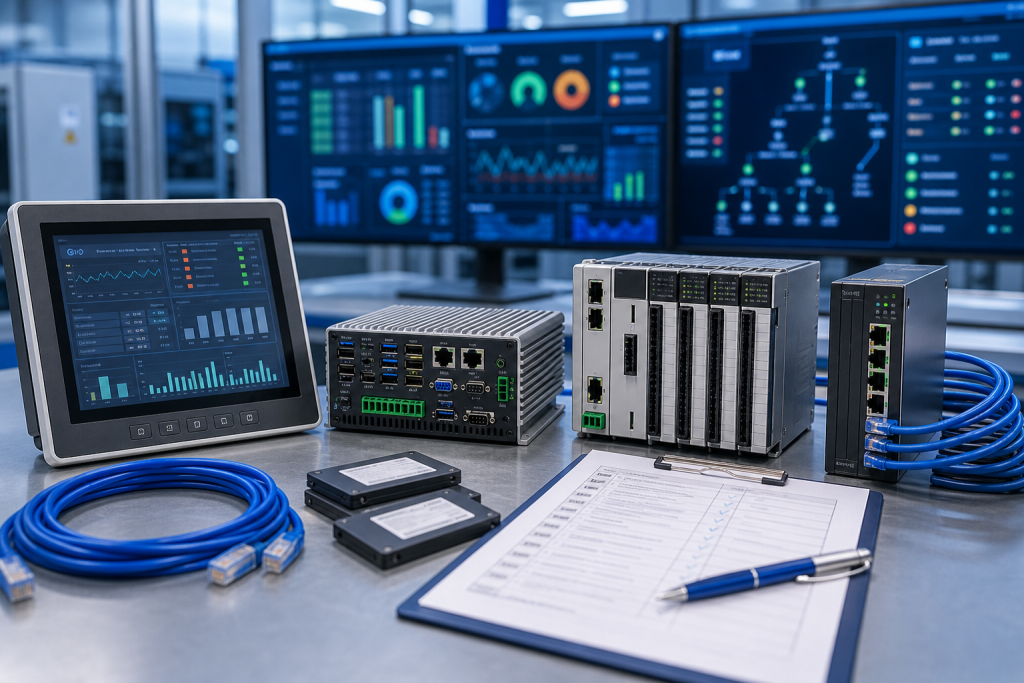
The spare kit may include industrial PC, SSD, power supply, network card, gateway, USB license device, backup media, and patch cables. If any of those items are missing, the backup may be technically available but operationally useless.
For remote systems, include travel and access. A restore process that requires an engineer onsite is different from one that can be completed from the control room.
Make procurement part of recovery
When buying monitoring spares, describe the recovery role. Emergency replacement, shelf replenishment, and test restore hardware are different RFQs.
Ask suppliers whether the hardware includes storage, power adapters, network cards, mounting, and accessory evidence. A cheap device-only offer may not protect an alarm recovery window.
After receiving the item, attach photos and acceptance status to the backup record. The next outage should begin from verified evidence, not old emails.
Procurement and receiving discipline
A useful RFQ separates immediate replacement, planned shelf stock, test-bench hardware, repair exchange, and possible substitute. These are not the same purchasing need. Immediate replacement needs dispatch certainty and accessory completeness. Planned stock can allow more time for condition comparison. Test hardware may be acceptable with a narrower configuration if it is clearly labeled and never treated as production-approved stock.
Ask for actual photos, visible labels, port views, accessory scope, condition language, warranty terms, and realistic shipment timing. Compare device-only quotes against field-ready kits carefully. A low price can become expensive when a missing connector, memory card, cable, power supply, mounting part, or configuration owner forces a second shipment during the maintenance window.
Receiving inspection should mirror the RFQ. Confirm model, ports, power input, accessory count, packaging, visible condition, and included documents before the item enters stores. If firmware, software, backup, or approval status is unknown, mark it unknown. Clear uncertainty is safer than a quiet assumption that will surprise the next technician.
Keep the record alive
After the order, save the original RFQ photos, supplier photos, final quote, received-item photos, and engineering comments together. That file becomes the next buyer’s starting point. It also helps the maintenance team when the same platform appears in a later advisory, outage, shutdown, or modernization review.
Use simple status labels: exact match, possible substitute, repair option, test bench only, and rejected. A conditional spare should not sit on the shelf pretending to be an exact replacement. Stores staff and night-shift technicians need the same clarity as the engineer who approved the quote.
Review the record after the next field repair. If a cable, license note, backup file, terminal plug, network setting, or configuration owner became the bottleneck, add that lesson to the standard kit. Spare planning improves when purchasing evidence and repair evidence are allowed to meet.
Risk grading keeps the work practical. Not every item deserves the same shelf depth, but every critical item deserves a clear decision. Rank by downtime consequence, lead time, substitute confidence, backup complexity, local skill, and whether the plant can still operate while waiting. This turns spare planning from opinion into a defensible maintenance action.
A short review rhythm is enough for most teams. Before shutdowns, pull the highest-risk records, confirm the spare still exists, check that accessories remain boxed with it, and verify that the named technical owner is still current. Quiet drift is common in store rooms; catching it early is far cheaper than discovering it during a night callout.
FAQ
Why validate backups if hardware spares exist?
Because monitoring recovery depends on software, drivers, licenses, databases, and network settings as much as the industrial PC.
What should a monitoring recovery test include?
Check live data, alarms, trends, reports, user login, gateway status, and operations acceptance.
Can a virtual machine replace spare hardware?
Sometimes, but only if host capacity, network mapping, licenses, storage, and restore permissions are tested.
What should I send DriveKNMS?
Send host photos, backup status, gateway details, accessory needs, destination, and deadline through the request a quote channel.
Send DriveKNMS your monitoring-system backup gaps and spare hardware photos. We can help identify what must be staged before visibility is lost.
© 2026 DriveKNMS. All rights reserved. Official Website: https://driveknms.com Inquiry: sale@driveknms.com | WhatsApp/Tel: +86 18359293191