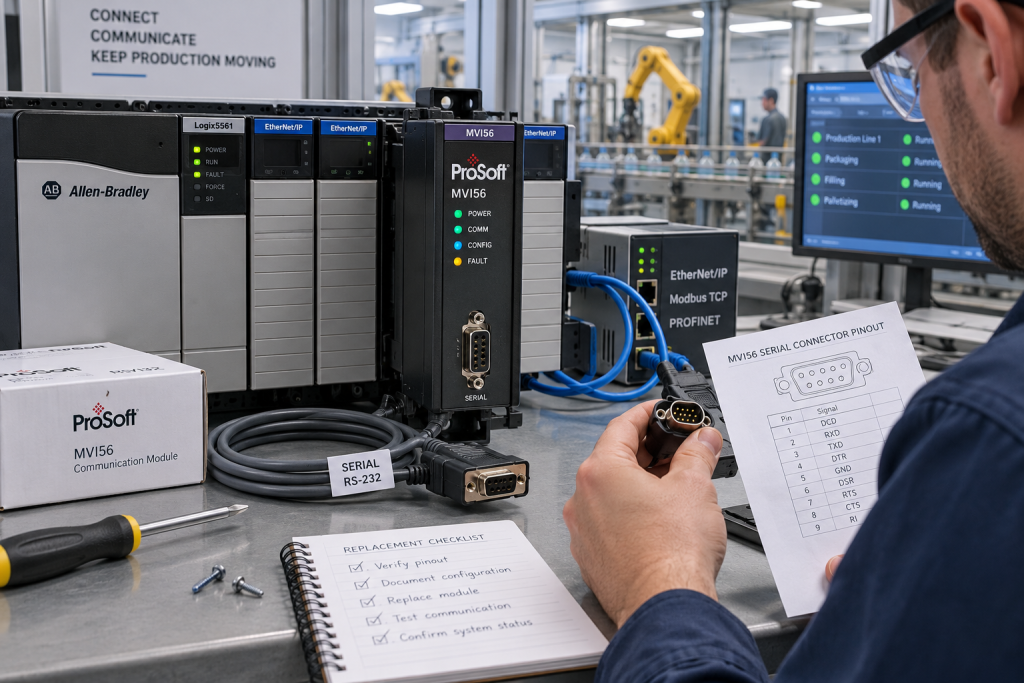
Communication modules rarely fail in isolation. When a legacy ControlLogix station stops exchanging data with a meter, drive, analyzer or remote controller, the first instinct is often to order the module with the most familiar family name. That can be expensive if the real issue is a protocol setting, serial cable, termination, slot configuration or a gateway on the other side. ProSoft MVI56 modules deserve a disciplined identification process because two units can look similar while serving different networks and data paths.
Capture the communication boundary
Begin with the signal path, not the spare shelf. Draw the route from the ControlLogix chassis through the MVI56 module, cable, terminal or converter to the external device. Record the chassis slot, module label, firmware or configuration revision, cable type, connector, baud rate, parity, data bits, stop bits, addressing and message direction. Identify whether the path is serial, Ethernet, Modbus, DF1, ASCII or another protocol. The installed project and gateway documentation should support every field in the record.
Save the first fault, message counters, timeout values, controller status and any device-side alarm before resetting. Note whether all devices are offline or only one node, whether the failure follows a power interruption, and whether the station continues to execute its local logic. A network-wide symptom points to a common path; a single-node symptom may point to field cabling, addressing or the device itself. Preserve timestamps when comparing logs from systems with different clocks.
Do not confuse module identity with protocol identity
An MVI56 label identifies a hardware family, but the application configuration determines what the module actually does. A replacement with a similar faceplate may use a different firmware generation, port function or configuration file. Compare the full order code and suffix with the approved bill of material. Confirm the expected slot and the software object that owns the module. Never load a configuration file simply because the file name contains MVI56; verify the controller, rack and application reference first.
Check the external device list and the exception map. A working module can report timeouts because a slave address changed, a gateway was replaced or a cable was moved to a different port. For a multidrop segment, record the termination and biasing arrangement. For Ethernet, record IP, subnet, gateway, managed-switch port and any approved VLAN or firewall boundary. These details are part of the spare decision because a hardware swap without the communication baseline will not restore the process.
Use an exact product reference, then validate the site fit
DriveKNMS lists a ProSoft MVI56-GEC ControlLogix Ethernet communication module and a ProSoft MVI56-DFCM communication module. They represent different communication roles. Compare the installed label, port arrangement, protocol, controller configuration and external device map before requesting either item. A catalog reference is not a permission to substitute one module for another.
For an RFQ, include the complete module label, chassis and slot, controller family, firmware or configuration revision, protocol, port and cable photographs, external device model, quantity and required condition. State whether the need is for a new, repaired, exchange or tested used unit. Ask what inspection and configuration evidence can accompany the proposed spare. This is more useful than sending only a cropped front-panel photograph.
Protect configuration before removal
Back up the controller project, module configuration, message instructions, device list and network records using the approved site method. Record the backup date, checksum or version identifier and storage location. Export only what the controls owner authorizes. Do not make exploratory edits to polling intervals, retry counts or serial settings while the process is running. A temporary change can hide the original failure and create a second recovery problem.
Before removing a module, agree the safe state, isolation, work permit, bypass or inhibit controls and rollback plan. Label cables at both ends and photograph their orientation. Keep the removed hardware in an antistatic package with the as-found notes. If a known-good spare is used to isolate the fault, change one boundary at a time so the result is meaningful. Avoid replacing a module and a gateway together unless the approved plan requires it.
Test the data path, not just the indicator LEDs
After installation, verify recognition in the correct chassis slot, module diagnostics, configuration identity, link or serial status, message counters and the external device response. Confirm the expected data types, scaling, quality flags and update rate with an approved test. A green status light proves only that part of the module is powered and running; it does not prove that a pressure value, interlock or permissive is correct in the application.
Document the final port settings, cable identity, device addresses and test results. Remove temporary forces, test jumpers and diagnostic connections. Ask operations to confirm the process display and alarm behavior before closing the work order. Update the spare register with the exact module and the configuration file that belongs to it. This turns a one-time recovery into a repeatable maintenance capability.
Questions maintenance teams ask
Can an MVI56 module with the same chassis fit replace any other MVI56?
No. Confirm the exact model, communication role, protocol, port arrangement, firmware and ControlLogix configuration. Similar housing does not establish compatibility.
What is the first thing to record when a communication module fails?
Capture the complete label, rack and slot, protocol, cable and connector path, fault chronology, message counters and the affected external devices before resetting.
Should the configuration file be copied to a replacement immediately?
Only through the approved controls procedure after the module identity and project baseline are confirmed. Preserve the original backup and do not use a file from a similar but different station.
Why can a replacement module show healthy LEDs but no process data?
Protocol settings, addressing, cabling, gateway routing, data mapping or scaling may still be wrong. Test the complete data path and application values, not only module power.
For a ProSoft MVI56 inquiry, send DriveKNMS the full model and suffix, chassis slot, protocol settings, cable and connector photographs, external device list, required condition and recovery window. We can help check the hardware reference and the evidence needed for a controlled replacement.
© 2026 DriveKNMS. All rights reserved. Official Website: https://driveknms.com Inquiry: sale@driveknms.com | WhatsApp/Tel: +86 18359293191